Dynamic Binary Visualization
Notice that this article is based on this cool video!
Binary Visualization explores a simple idea: turn raw binary files into images, so humans can spot patterns with their eyes instead of reading endless hex dumps.
A small Rust script (compiled to WASM) converts bytes into 256×256 visual fingerprints. Potential applications include data recovery, malware understanding, document clustering, and traffic analysis.
Early results look promising, but also show a hard limit: large binaries are difficult to compress into a tiny image without losing structure.
The Binary Visualization Console lets you upload a binary file and visualize it as an image. I recommend using it with multiple executable files and compare them visually. Exec files are good to quickly identify your first patterns 😎
Why visualize binaries?
Reverse engineering tools usually display binaries as hex dumps or disassembly, which is accurate but cognitively expensive. Chris Domas describes the core problem well: there’s a gap between raw bytes and high-level reasoning tools—and humans are left to bridge it with intuition and experience.
Dynamic binary visualization tries to bridge that gap with a representation the brain is good at: spatial patterns. Instead of parsing structure first, you get a quick “shape” of the binary: regions, repetitions, anomalies, and transitions.
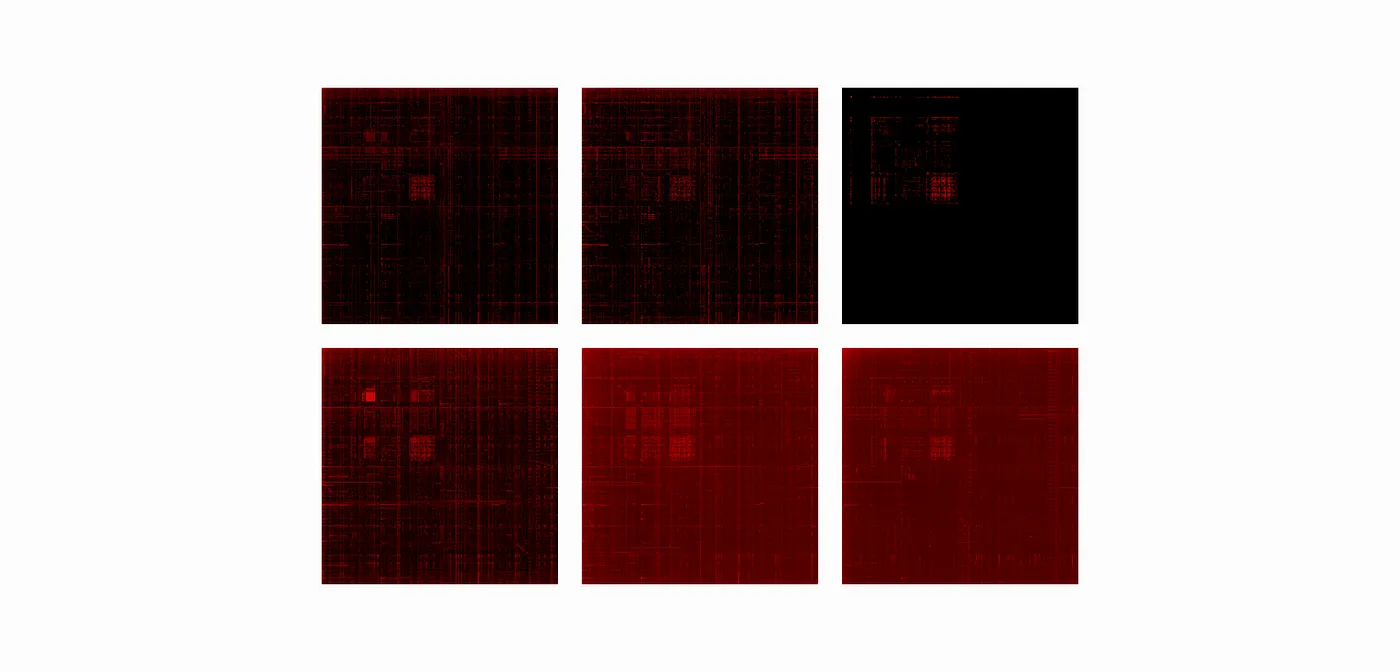
A naive (but effective) generator
The dataset generator is intentionally simple:
- Read the binary file
- Slide over it in a window of two bytes
- Interpret the pair as
(x, y)coordinates where each byte is in[0, 255] - Plot points into a 256×256 image
This approach is fast and produces recognizable patterns, but it is also naive:
- it doesn’t preserve locality in a principled way
- it doesn’t explicitly surface compression/encryption zones
- it compresses huge files into a fixed image size, which can blur structure
Scaling up: chunking
Large executables don’t fit nicely into a single 256×256 summary. A practical fix is chunking: split the file into smaller ranges and visualize each chunk. This enables exploration at multiple scales and makes “where is the weird region?” questions much easier.
Better locality with space-filling curves
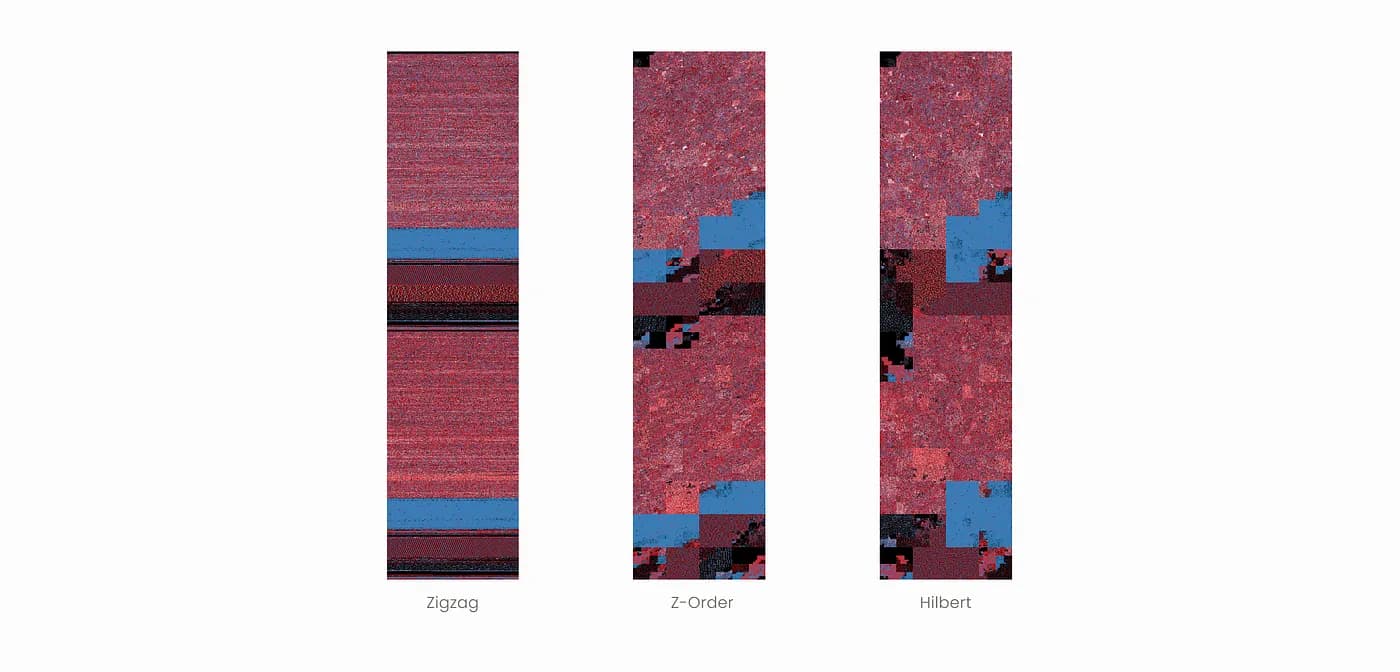
Aldo Cortesi explored a more advanced approach using space-filling curves (zig-zag, Z-order, Hilbert). The idea is to map a 1D byte stream into 2D while preserving locality as much as possible.
Key takeaways from Cortesi’s experiments:
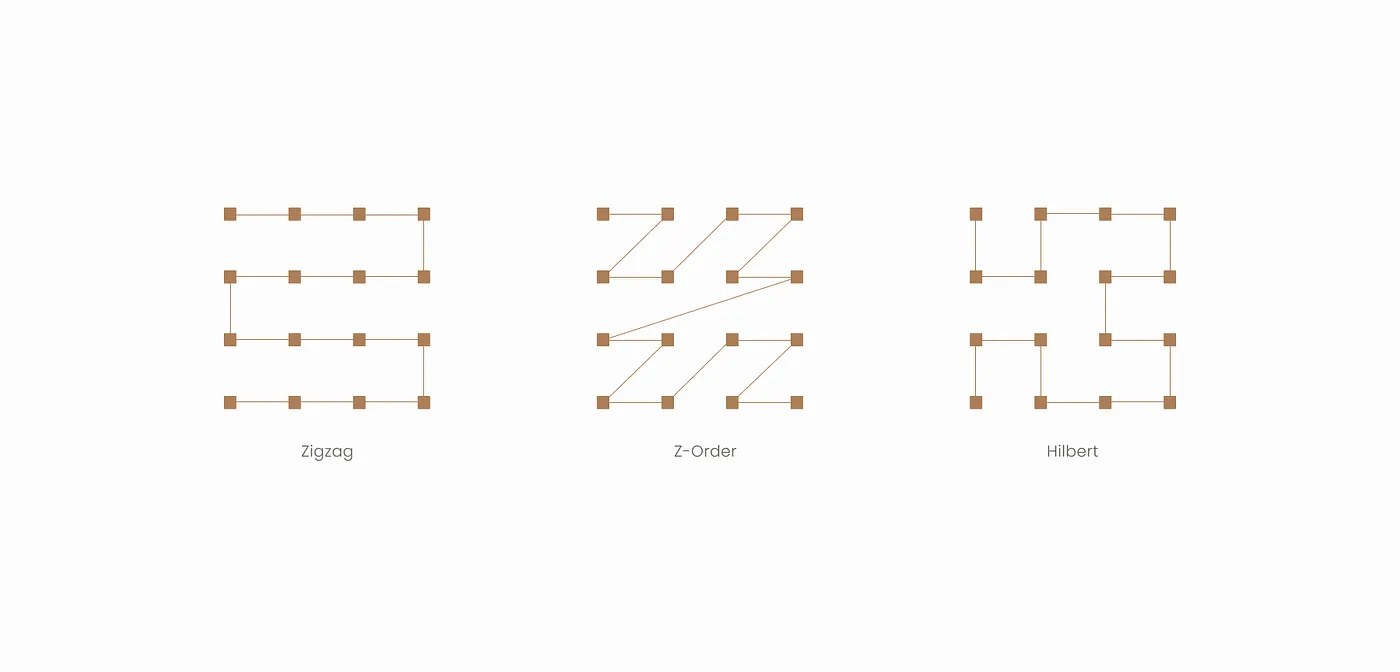
- Hilbert curves preserve locality best (but are more complex to generate)
- Z-order is simpler and faster, but weaker on locality
- zig-zag tends to wash out small-scale features
I didn’t integrate this approach yet, but it’s one of the most promising directions to reveal global structure at a glance.
Here are some visualizations by Aldo Cortesi using space-filling curves:
Dataset creation
The Binary Visualization Dataset was built with a simple pipeline:
- Collect binaries (Kaggle datasets + executables from a personal ARM laptop)
- Clean / preprocess (remove metadata when relevant, keep raw bytes)
- Visualize using the Rust script
- Annotate by directory-based labeling
- Validate basic integrity and reproducibility
Covered categories include:
- images (
jpg,png,bitmap, …) - audio (
wav, …) - executables (ARM and
x86_64)
Example layout:
binary_visualization_dataset/
  audio/
    wav/
  executables/
    ARM/
    x86_64/
  images/
    bitmap/
To preserve provenance, visualizations keep the original filename and add a suffix like:
original.bin.bvtool.png
The dataset is publicly available via the project repository.
Conclusion
This project reinforced a simple lesson: visualization can turn an expert-only task into pattern recognition, which humans are very good at!
But it also exposed the main challenge: large binaries are hard to summarize without losing meaning. Chunking helps, and locality-preserving mappings (like Hilbert curves) look like the next step.
References
- C. Domas, The Future of RE, REcon 2013 (Jun. 2013).
- A. Cortesi, Visualizing binaries with space-filling curves (Dec. 2011).
- A. Cortesi, Visualizing entropy in binary files (May. 2016).
Want to continue reading? Check out this article to learn a magic trick that instantly reduces the memory footprint of your programs 🤓